

The Lens Workstation agent registers itself with the Lens Collector for your site. This process keeps the communication between the Lens system and the workstation secure. Registration happens automatically when the agent service is started. The agent will attempt to register the system continuously until successful.
For registration to work, the agent needs to know the hostname/FQDN or IP address of the Lens Collector. These are usually set upon installation, but they can be changed after installation too.
Checking the registration status
-
Open the
7fivefive Lens Workstation Agent-
From the Windows Start Menu
-
From the Windows Notification Area
-
-
In the Workstation Agent window, select the
Registrationtab -
You can see the registration status (indicated by an
or ❗ icon), and the current collector FQDN
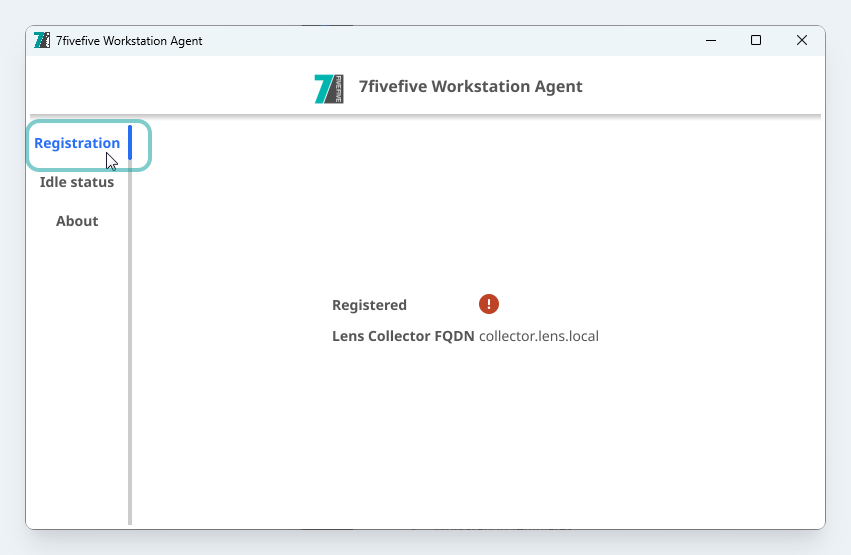
The ‘Registration’ tab
Changing the Collector settings
Option 1 (Recommended)
The simplest and safest option is to re-install the Lens Workstation agent with the new collector details.
Option 2
You will need to be a Windows administrator to perform these steps.
Use care when modifying the Windows registry as it stores system settings that are crucial to the stability of Windows.
-
Open the Windows Registry editor as an Administrator
-
Navigate to
HKEY_LOCAL_MACHINE\SOFTWARE\7fivefive\Lens Workstation Agent -
Update the value of the
LensCollectorFqdnorLensCollectorPortas needed -
Restart the agent service
Restart-Service LensWsAgent