

-
Login to the 7fivefive Lens application with a user that has the
Administratorrole or has theAccess to Settingsoption enabled on their role. -
In the sidebar or navigation bar go to the
Configurationoption, then select thePortalitem from the menu -
Under the
Portalsection, select theAnnouncementsoption -
Click the
Addbutton. A modal window will appear. -
Make the changes you require
-
Click the
Addbutton
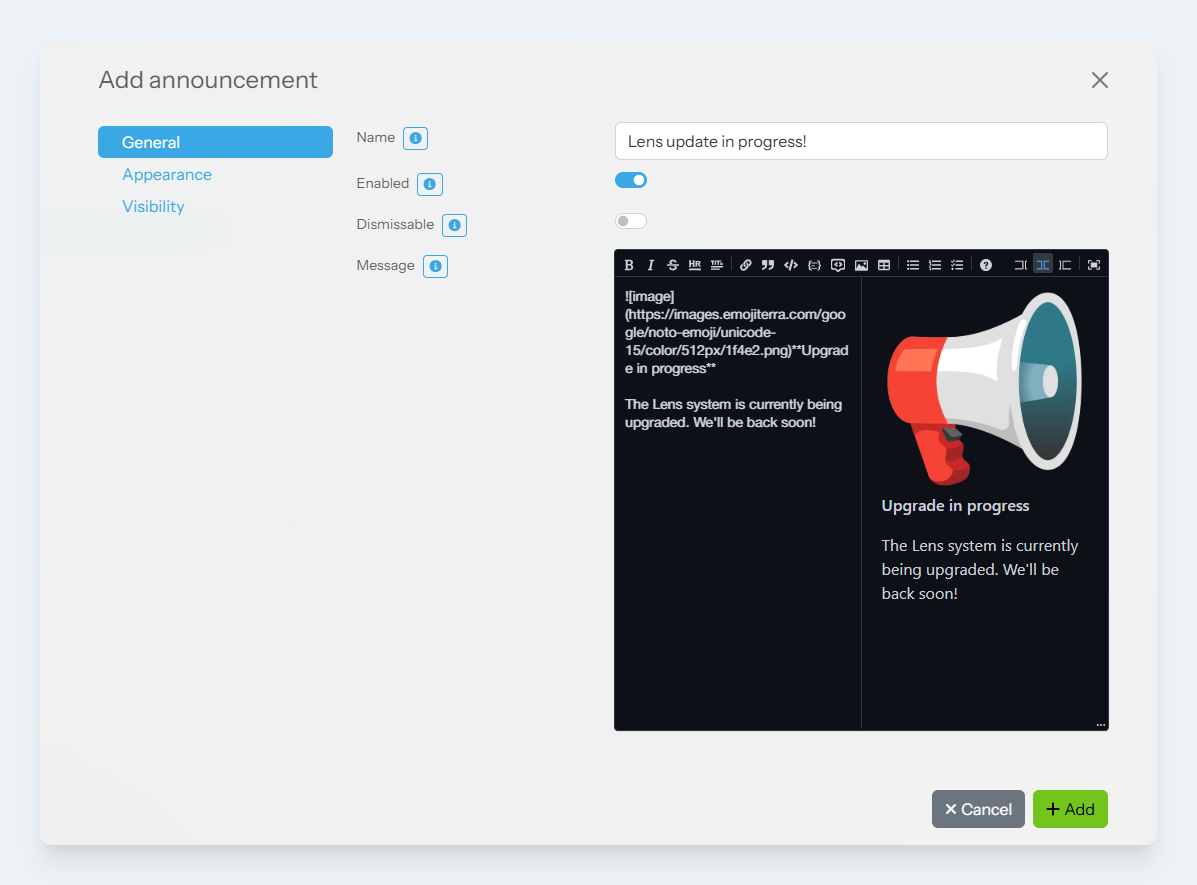
Options
General
|
Item |
Description |
|---|---|
|
|
The name of the modal. This is displayed:
|
|
|
When checked, the announcement can be visible in Lens, depending on the visibility options. |
|
|
If this setting is checked, then users can dismiss the announcement. The announcement will then not be shown again for that user whilst they are using the same browser. |
|
|
In the markdown editor, you can create a rich message that will be displayed to users. See this page for more information about markdown. |
Appearance
|
Item |
Description |
|---|---|
|
|
This option controls the style of the announcement. Available options are: |
|
|
This option controls where the announcement will be shown. See the list below for available options:
|
|
|
The slider controls the order of the announcements. Lower numbers will place the announcement nearer the top of the page. |
Visibility
|
Item |
Description |
|---|---|
|
|
Select one or more roles that can see the announcement. If no roles are selected, then all roles can see the announcement. |
|
|
Select one or more sites that can see the announcement. If no sites are selected, then all sites can see the announcement. |
|
|
The date that the announcement should be visible from. If this is not set, then the announcement will be visible immediately, until the |
|
|
The date that the announcement should be visible until. If this is not set, then the announcement will always be visible. |